Store operators, watch out! With accessibility for online stores , you can turn more people into potential buyers. The goal: everyone – with or without disabilities – should be able to shop with you without any problems.
With an accessible online store, you can expand your target group by 7.8 million people with disabilities. You also improve your search engine ranking. But it’s not just a nice-to-have, it’s a must-have. Why is that? It’s simple: accessibility will soon be mandatory for store operators!
This is the aim of the Barrier-Free Strengthening Act (BFSG). From June 25, 2025, B2C online stores must be barrier-free – otherwise you could face fines of up to 100,000 euros. This article explains exactly what accessibility in e-commerce means, why it is important for your online business and how your store can become (more) accessible.
Why accessibility is important for online stores
Did you know that most people with disabilities prefer to store online rather than offline? The reason: the shopping experience in stores such as supermarkets is often unpleasant for people with disabilities. It can quickly become difficult for blind people, wheelchair users or autistic people, for example.
That’s why they prefer to store online. Isn’t this the perfect opportunity for online stores? Yes and no. Because many stores are not designed to be accessible and are wasting sales potential. There is a better way – and thanks to the BFSG, there will soon have to be.
BFSG: Market potential and demographic advantages
- According to the World Health Organization (WHO), over 1 billion people worldwide live with a disability – that is around 15% of the global population. (As of 2011, World Report on Disability)
- Around 7.8 million people in Germany have a severe disability (as of 2021, Federal Statistical Office). A large market for skillful traders.
- Experts estimate the purchasing power of people with disabilities in Europe at over 780 billion euros (as of 2017, Bundestag archive)
- Demographic change is reinforcing this trend. By 2060, one in four Germans will be over 65 – an age group with an increased need for accessible services. (As of 2024, Statista)
BFSG: Competitive advantages
- 86% of users with disabilities say they are willing to pay more for products from accessible websites(Click-Away Pound Report, 2019)
- Accessible websites benefit from better SEO rankings, as many aspects of accessibility also improve search engine optimization.
- In a study by the UK Royal National Institute, a £35,000 investment by a supermarket chain in an accessible website resulted in additional revenue of £13 million. An ROI of 37043%.
- Inclusive companies that include people with disabilities in their offerings generate 1.6 times more revenue, according to an Accenture study
BFSG: Legal and ethical aspects
- The Accessibility Reinforcement Act (BFSG) comes into force on 25.06.2025 and also obliges online retailers to ensure accessibility.
- Violations can be punished with fines of up to 100,000 euros.
- The Web Content Accessibility Guidelines (WCAG) 2.2 are the international standard for accessible websites. The requirements of the BFSG are derived from this.
Laws on digital accessibility
In Germany, various laws and regulations govern the accessibility of websites. These are the most important ones:
- Barrier-free Information Technology Ordinance (BITV):The BITV 2.0 (2011) regulates the accessible design of federal administration websites. It is based on the Web Content Accessibility Guidelines.
- Web Content Accessibility Guidelines (WCAG):The WCAG 2.2 (as of 2023) set international standards for accessible websites. They are based on four categories of accessibility: perceptibility, usability, comprehensibility and robustness of web content. The WCAG are the practical guide to implementing accessible content.
- Barrierefreiheitsstärkungsgesetz (BFSG):The BFSG comes into force in 2025 and obliges many companies to design accessible products and services. Non-compliance could result in discrimination lawsuits and fines. Small companies are partially exempt.
- Disability Equality Act (BGG):The BGG has been in force since 2002 and promotes equality for people with disabilities in state institutions. It obliges public bodies to make their digital services accessible. It does not apply to the private sector.
- UN Convention on the Rights of Persons with Disabilities (UN CRPD):Ratified by Germany in 2009, the UN CRPD sets out human rights for people with disabilities. It calls for comprehensive inclusion, including barrier-free design of public areas and websites.
Frequent barriers in online stores
So far, so good. The question is: where exactly do online stores fail when it comes to inclusion, where are the barriers to use in e-commerce? We shed light on the five major barriers: technical, visual, auditory, cognitive and motor barriers. If you understand and remove these barriers, you are well on the way to an inclusive online store.
- Technical barriers: These include inaccessible website structures, lack of compatibility with assistive technologies and non-responsive designs. Examples include complex JavaScript functions without alternative access options or forms that cannot be operated using a keyboard.
- Visual barriers: Mainly affect visually impaired users. Problems arise due to poor color contrasts, font sizes that are too small, a lack of alternative text for images and insufficient scalability of the website. Complex layouts can also be difficult to navigate using a screen reader.
- Auditory barriers: Apply primarily to users who are deaf or hard of hearing. They arise due to a lack of subtitles or transcripts for audio and video content, exclusively acoustic information transfer (e.g. for error messages) or a lack of visual alternatives for audio feedback.
- Cognitive barriers: These are obstacles for users with learning or concentration difficulties. These include complicated language, confusing navigation structures, distracting animations, pop-ups and time-based functions that can cause stress (e.g. session time limits at checkout).
- Motor barriers: Affect users with limited mobility. Common problems: small click areas, tight time limits for interactions, lack of keyboard navigation or scrolling-intensive layouts. Complex drag-and-drop functions can also cause difficulties.
Practical tips for better accessibility in the online store
Accessibility in e-commerce may seem complex at first, but with the right strategies, it is achievable. This section provides practical tips in six key areas that will make your online store more accessible and user-friendly for everyone.
- Technical measures: ARIA labels and semantic HTML are very important for accessibility. ARIA labels provide screen readers with additional information. Semantic HTML makes the structure and content clear. Also important: the store must be fully keyboard accessible. This helps users who cannot use a mouse.
- Design strategies: Strong color contrasts and sufficiently large fonts make your store easier to read. A contrast of at least 4.5:1 is recommended for normal text and 3:1 for large text. Users should be able to adjust the font size. Ensure a clear structure and enough free space. Images need alternative texts. Forms should be easy to understand and use.
- Content organization: Write clearly and comprehensibly. Use short sentences and active verbs. Avoid technical terms. Structure texts with meaningful headings and lists. Offer a version in “easy language” for difficult topics.
- User tests: Test your store with people with disabilities. They find problems that developers often overlook. Carry out regular tests with different groups. Use the feedback to improve. Accessibility analysis tools such as BITV-Test, WAVE or axe can also help.
- Mobile accessibility: Many customers use smartphones. That’s why your store also needs to work well on small screens. Make buttons big enough to tap. The layout must be able to adapt. Check whether mobile screen readers such as VoiceOver or TalkBack work well.
- Training and sensitization: Train your employees regularly. This applies to developers, designers and content teams. This way, accessibility remains an important topic in your company. Keep up to date with new developments to keep improving your store.
Best practices in digital accessibility
Aktion Mensch and Google, together with other partners, have tested the accessibility of the most visited online stores. From the top 500 websites in Germany (Similarweb, 2023), 71 complete e-commerce stores were examined. Here are a few findings:
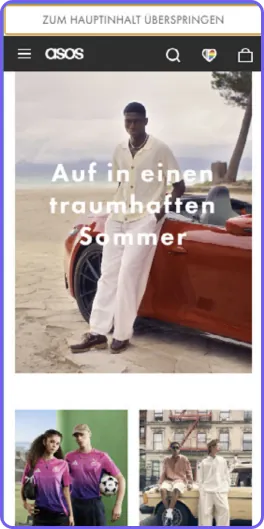
Keyboard operability at Asos
Asos.com shines when it comes to keyboard operability. Users can jump directly to the main content, the keyboard focus always remains visible and even the cookie banner can be easily operated using the keyboard. This is how barrier-free surfing works.
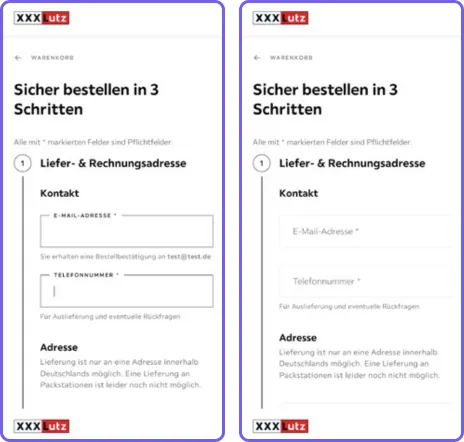
Labels at XXXLutz
Xxxlutz.de provides clear labels in front of and in the form fields. You can see immediately where you should enter your e-mail or telephone number. And the best thing? The labels remain visible even if you type in the field. So you always have an overview and errors are minimized.
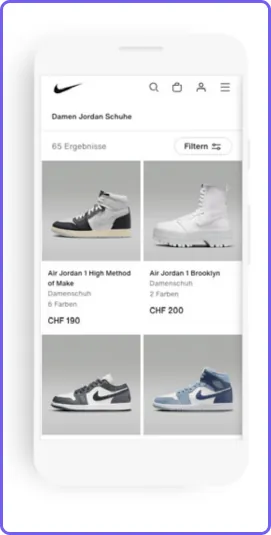
Contrasts at Nike
Nike.com shows the way: Crisp contrasts that catch the eye! Black lettering and symbols on a white background – that pops with a contrast of over 18:1, making it easy to read and click, with or without visual impairment.
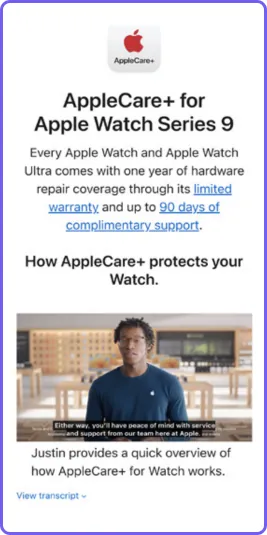
Multimedia content at Apple
Apple.com shows how it’s done: videos with subtitles for those who prefer to read. And if you want even more detail, you can find the complete transcription directly below the video. So nobody misses out – whether you can hear it or not.
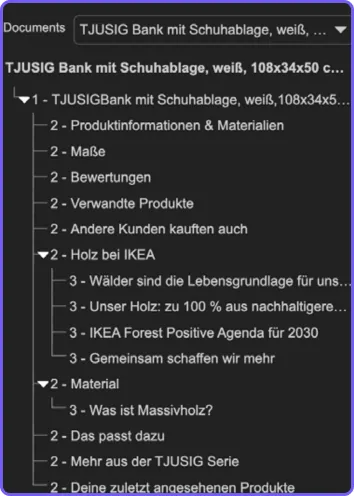
Headlines at Ikea
Ikea.com brings structure to the store: a glance at the headings overview shows it. Each product page has its own table of contents. The headings are complete, to the point and in the right order.
Accessibility for online stores – resources & tools
The internet is teeming with tools to help you on your way to greater accessibility. We have compiled important resources & tools for web accessibility:
Analysis tools
- AXE: Automated tool for detecting accessibility problems. Contains suggested solutions.
- WAVE: Visual representation of accessibility problems directly in the browser context.
- Lighthouse: Google tool for accessibility, performance and SEO audits.
- accessiBe: AI-supported tool for continuous monitoring and improvement of accessibility.
Assistive tools
- JAWS: Comprehensive screen reader for Windows with advanced functions.
- NVDA: Free, open-source screen reader for Windows.
- VoiceOver: Integrated screen reader for Apple devices.
- Dragon NaturallySpeaking 11Speech recognition software for PC control and text input.
- Google Voice Access: Android app for voice-controlled smartphone operation.
- ZoomText: Screen magnifier with screen reader functionality for the visually impaired.
Documents
- BFSG legal text: Official wording of the Accessibility Reinforcement Act.
- WCAG 2.2 guidelines: Current version of the Web Content Accessibility Guidelines.
- WCAG 3 Draft: Preview of future developments in accessibility standards.
Further links
- Bundesfachstelle Barrierefreiheit: Official government information source for accessibility in Germany.
- WCAG checklist: Structured list of all WCAG 2.0 criteria for systematic implementation.
Summarized
Accessibility in e-commerce is a win-win situation: you reach more customers, improve your SEO ranking and fulfill legal obligations. The BFSG makes accessibility mandatory for most online stores anyway.
From technical measures to design and clear language – there are many ways to make your store more inclusive. Major players such as Apple and Zalando are leading the way.
Remember: accessibility is an ongoing process that pays off. You are not only creating a better shopping experience for people with disabilities, but for all your customers.
Do you need support with the implementation? We will be happy to help you make your online store accessible. The best thing to do is to send us a message.